Creating Purchase Orders
A Purchase Order (PO) is a formal document sent to a supplier requesting goods or services at an agreed price. In Evrykit, POs trigger stock receipts, quality checks, and supplier invoice matching — covering the full procure-to-pay cycle.
💡 You need at least one supplier and the products you want to order before creating a PO.
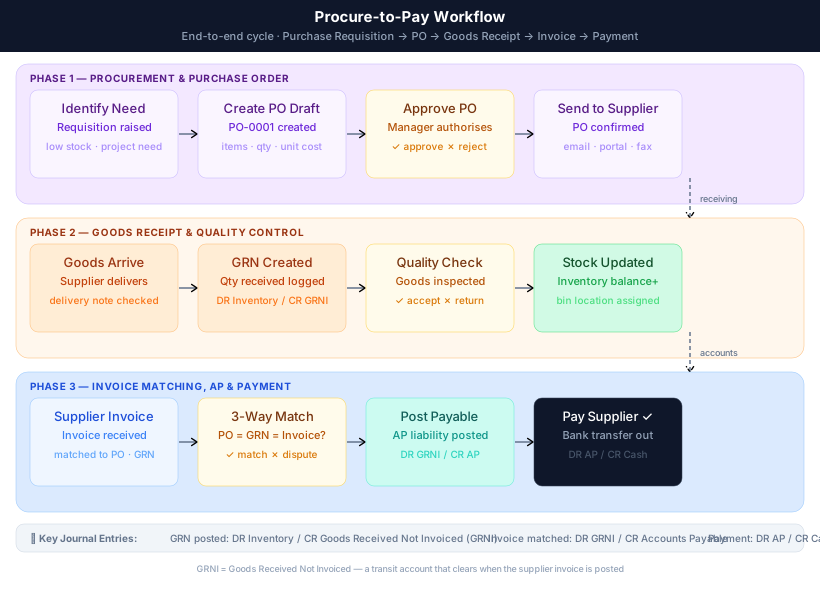
Procure-to-Pay Workflow
The diagram below maps the complete journey — from identifying a need through to the final payment and AP clearance:
Step-by-Step: Creating a Purchase Order
1. Navigate to Purchasing → Purchase Orders
Click New Purchase Order in the top right.
2. Select a supplier
Type the supplier name and select from the dropdown. The supplier's payable account will be used for automatic accounting postings.
3. Set the order date and expected delivery date
The order date defaults to today. Set an expected delivery date for planning purposes.
4. Add line items
Click Add Line to add products. Enter the quantity, unit cost, and applicable tax. The system uses these costs for inventory valuation when goods are received.
5. Confirm the purchase order
Click Confirm PO to lock the order. A confirmed PO can no longer be edited; it awaits goods receipt.
Receiving Goods (GRN)
Once goods arrive, go to the confirmed PO and click Receive Goods. Enter the actual quantities received (which may differ from ordered quantities for partial deliveries). Evrykit will:
- Create a stock movement increasing inventory.
- Post the accounting entry: Debit Inventory / Credit Goods Received Not Invoiced (GRNI).
ℹ️ GRNI is a transit account. It clears when the supplier invoice is posted, replacing it with Accounts Payable.
Three-Way Matching
When the supplier's invoice arrives, Evrykit matches it against the PO and the goods received note:
- Open the PO and click Create Supplier Invoice.
- The invoice is pre-populated from the PO lines.
- Adjust any price variances if needed.
- Post the invoice — Evrykit journals: Debit GRNI / Credit Accounts Payable.
If the quantities or prices don't match, Evrykit highlights the discrepancy before you can post.
PO Statuses
| Status | Description |
|---|---|
| Draft | Editable. Not sent to supplier yet. |
| Confirmed | Locked. Awaiting delivery. |
| Partially Received | Some lines received; delivery ongoing. |
| Fully Received | All goods received. Awaiting invoice. |
| Invoiced | Supplier invoice posted. |
| Closed | Fully received and invoiced. |
Required Permissions
Pages.Procurement.PurchaseOrders.ViewPages.Procurement.PurchaseOrders.CreatePages.Procurement.PurchaseOrders.ConfirmPages.Procurement.PurchaseOrders.Receive